



Get It!  Waterloo is a tool that will speed up your research process and increase
its effectiveness. Get It! Waterloo
enables you to connect from a research database directly to University of
Waterloo Library's resources such as online full-text articles, or to
title listings for non electronic / print journals, books or other library
materials in the library catalogue.
Waterloo is a tool that will speed up your research process and increase
its effectiveness. Get It! Waterloo
enables you to connect from a research database directly to University of
Waterloo Library's resources such as online full-text articles, or to
title listings for non electronic / print journals, books or other library
materials in the library catalogue.
| 1. Having found an article in a database, click on the "GetIt!" button | 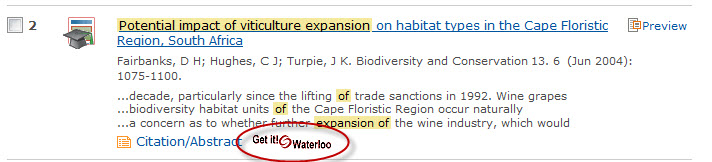 |
| 2. You get several choices. Usually, the topmost choice will be the one to choose, in this case taking you to: | 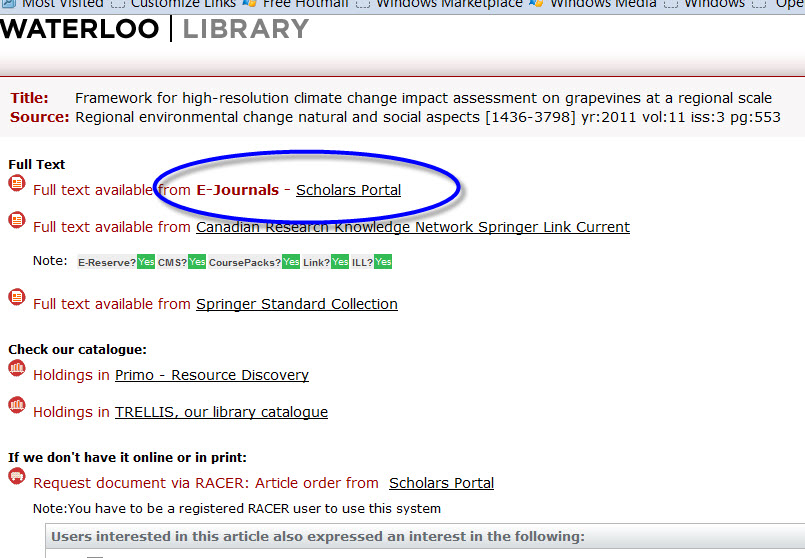 |
| 3. The article online. While there may be intermediate steps here they are generally straightforward. |  |
The Get It!  Waterloo service has been activated for databases on many servers, such as Ebsco, Engineering Village, Google Scholar, MathSciNet, ProQuest, PubMed, RefWorks, Scholars Portal, SciFinder, and Web of Science. Additional databases
will be activated as the software is implemented.
Waterloo service has been activated for databases on many servers, such as Ebsco, Engineering Village, Google Scholar, MathSciNet, ProQuest, PubMed, RefWorks, Scholars Portal, SciFinder, and Web of Science. Additional databases
will be activated as the software is implemented.
Waterloo from databases.A button incorporating the symbol
will appear in those databases which have been activated. Look for it next
to the brief citation or in the
document record. Depending on the database, this button could look
like:
|
 |
 |
or the text "Get It!@Waterloo" |
Click on this button; a new window will open and the Get It! Waterloo menu
will appear. The links that Get It! Waterloo
provides are dynamic and context sensitive; that is, you will see
different options for different citations.
Clicking on any of these links will open a third window. At the moment we cannot force these to open in a new tab, this is controlled by the browser software.
Additional services and options will be offered through the Get It!
Waterloo menu at a later date.
To learn more about Get It!
Waterloo service, read the Frequently
Asked Questions .
For help using SFX, contact an Information Desk